
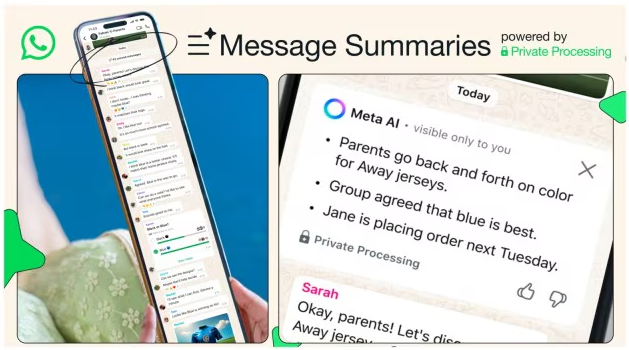
WhatsApp announced on Wednesday, June 25, that it would display AI-generated summaries based on their unread messages. The messaging app posted an explanatory GIF on its blog to show how it would be able to condense a long list of unread messages. Previously, users had to go through and read all the messages they missed in a chat, but with the new feature, they’ll receive a personalised AI summary of those messages. These briefs would be as bullet points.
“…We’re testing Message Summaries, a new option that uses Meta AI to help you securely and privately summarise your unread messages in a chat — so you can quickly get a sense of what’s happening, without reading the details of each unread message in your chat,” WhatsApp had said in the official release.
The feature is currently live in English for users in the US. But WhatsApp added that it is planning to roll out the feature to more countries and languages later in the year.
According to the GIF shared by WhatsApp, customers only need to tap on the number indicating the unread messages in a chat to receive a quick summary provided by Meta AI. These digests will be viewable only by the user and will be able to be turned off. It should be noted that the reliability of these summaries have not been tested.
On the Message Summaries feature, WhatsApp says it’s employing a thing called Private Processing that makes it possible for Meta AI to return something actionable without Meta or WhatsApp seeing any of a user’s messages. The system promises that no one in the chat will be able to view summarised unread messages, thereby protecting user privacy. The Message Summaries feature is disabled as a default, but can be activated by the user if he so prefers.
The feature was much anticipated even before the official announcement, as reported by WABetainfo, a platform that tracks WhatsApp developments.
Over the last few months, Meta has been bringing AI-powered capabilities to the widely-used messaging service to enrich the user experience. These features have include the Meta AI button, the ability to tag Meta AI in Chats to ask queries or create images during an ongoing conversation. These both function on by defaults, and there is no option to disable the feature.